August 27, 2008
0 photos, 1 blogs
Browse Archive (306 months)


After [three years](http://eecue.com/log_archive/eecue-log-412-GTD.html) of [life changing](http://eecue.com/log_archive/eecue-log-964-Getting_Things_Done_and_How_It_Changed_My_Life.html) organizational goodness, I migrated my plain-text-based [GTD system](http://en.wikipedia.org/wiki/Getting_Things_Done) to [OmniFocus](http://www.omnigroup.com/applications/omnifocus/). My text list system has not been the most efficient implementation. I decided it was time for a standalone application. After reading [this GTD application comparison](http://putthingsoff.com/osx-task-manager-showdown/) and watching a [screencast about OmniFocus](http://downloads.extremesims.com/omnigroup/software/MacOSX/movies/OmniFocus/omnifocus.quickstart.m4v) I decided to download the trial and give it a shot. OmniFocus is a slick application. Thanks to its [Cocoa](http://developer.apple.com/cocoa/) goodness, it integrates perfectly with OS X. It has an easy-to-use interface, but its plethora of features takes some getting used to. The hardest part was manually importing my several hundred tasks and projects. I had to copy and paste these one by one. It would be a nice feature if OmniFocus could parse plain text files and import each line as a task. Once my tasks were imported I created projects and folders as you can see in the [screenshot below](#omnifocus_screenshot). I then created contexts, some of which you can see in the right hand column of the screenshot. When I was using my text lists I didn't fully utilize contexts properly, but OmniFocus makes them easy to implement. You can switch to Context mode, select a context like "Office" and see all the tasks that can be done in your office. OmniFocus has a nice feature called Perspectives, where you can save a predetermined view of your tasks. I have one which I use to implement [Zen Habits MITs (Most Important Tasks)](http://zenhabits.net/2007/02/purpose-your-day-most-important-task/). Every night before I go to bed I review my Next Actions perspective and flag the tasks I want to complete the next day. The MITs perspective shows my flagged items, which I then (in theory) do. I also have the iPhone app installed. It's not cheap: $20, but it works fairly well apart from the syncing speed. It takes a very long time (5-10 minutes) to sync changes over the EDGE network, which basically make it close to useless for quick entry. If I know I'm going to be using is I can let it sync for a few minutes. OmniFocus is supposed to sync to a WebDAV server, but it fails on my FreeBSD server running Apache 2.2.3. I am forced to sync using Apple's buggy Mobile Me. I hope they fix the WebDAV sync issues before my Mobile Me free trial runs out! #### OmniFocus: The Good * Feature rich GTD management. * Contexts rock for doing what you can, where you can. * Perspectives make reviewing, viewing and doing fun and easy. * Simple, system-wide quick-entry is only a keystroke away. * Due-dates and start-dates make planning and remember tasks easier. * Automated email parsing pulls tasks from [Jott](http://jott.com/default.aspx) and other email based note taking systems. * SneakyPeak version with syncing is still in beta and thus is free. #### OmniFocus: The Bad * WebDAV export and syncing is broken. * Syncing to iPhone app over EDGE takes over 5 minutes, making the app nearly worthless for quick entry. * iPhone app is expensive: $20 * Desktop app is even more expensive: $80 ($120 for family pack) Despite the imperfections and relatively high price, I really like OmniFocus. As soon as they fix the syncing (or they stop extending the free trial) I will be purchasing a license. [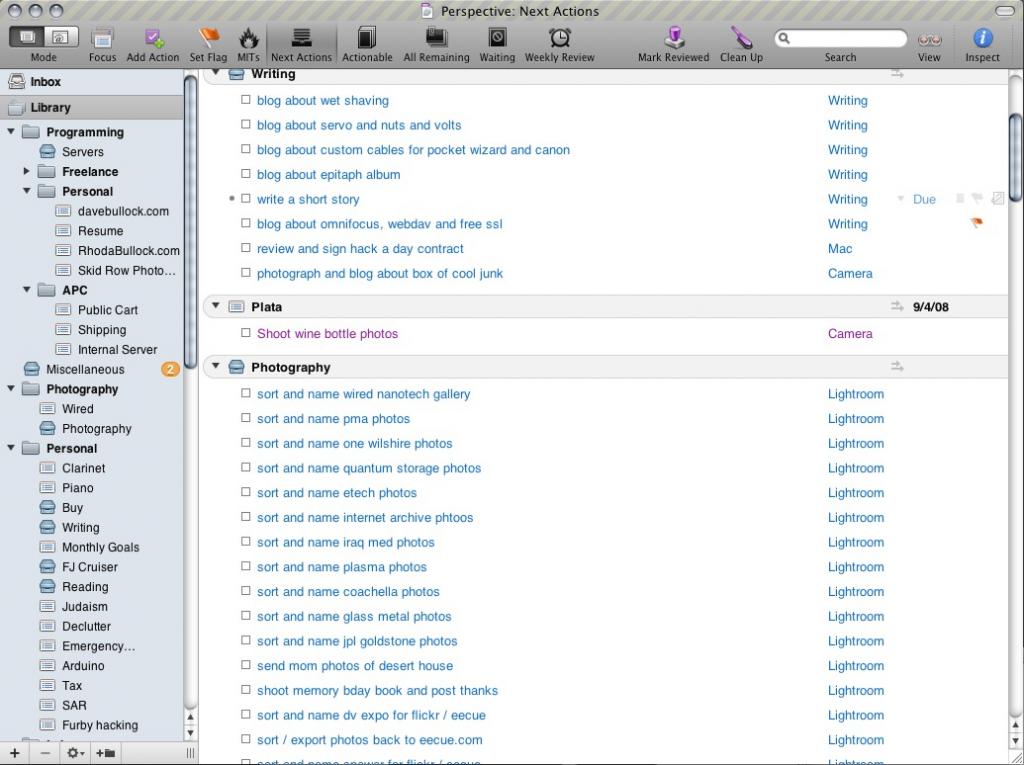](https://eecue.com/p/30649/GTD-with-OmniFocus.html)